This article outlines best practices for planning, creating, and administering NoRedInk Writing Benchmarks. Following these steps will help ensure your Benchmarks run smoothly and produce meaningful data to guide instruction across your district.
Plan Your Benchmark
Choose effective prompts
Use the grade-level filter to select grade-appropriate prompts. For best results, we recommend choosing pre-made prompts (rather than custom prompts). These prompts have been curated for the Benchmark use case.
Use similar prompts across Benchmarks in a series so you can compare results meaningfully. Ensure alignment in:
Configure grading
For Grades 6+, select Grading Assistant-enabled prompts to ensure consistent, automated scoring. If teachers will score manually, schedule calibration sessions to promote shared understanding of the rubric. Learn more in Writing Benchmark Grade Norming and Its Importance.
Plan your timeline
Allow enough time for administration and scoring. We recommend giving teachers two weeks to administer the benchmark, plus another one to two weeks to grade student submissions.
Allow enough time between Benchmarks in a series. We recommend a 3-month gap, with a minimum of 4 weeks between administrations.
💡 Customize the term "Benchmark" to match the preferred language used on campus. These setting can be applied to specific schools, and the terminology will appear consistently throughout the teacher interface. You can customize the term through your Admin Tools!
Prepare Teachers and Students
Before your teachers administer the Writing Benchmark, clarify directions and expectations. Send an email to all participating teachers ahead of time that includes:
- Your educational objectives for the benchmark
- The administration window and deadlines
- Expectations for student preparation and participation
To help reduce anxiety for students, encourage teachers to:
- Have students log in to NoRedInk before benchmark day
- Familiarize students with NoRedInk
- Explain the purpose of the benchmark assessment
Monitor Administration Progress
Once the administration window has begun, you can track participation status via the Writing Benchmarks landing page. We recommend that at least 50% of the eligible classes, those tagged with the target grade level, and 50% of the assigned students complete the benchmark cycle, meaning the assignment has been created, submitted and graded.
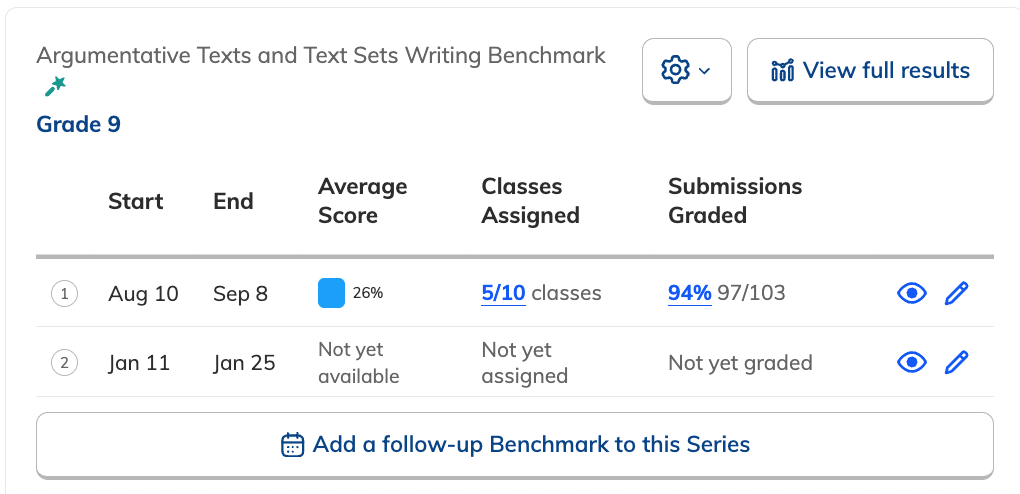
To keep administration on track, consider reaching out to teachers who haven’t yet assigned the Writing Benchmark to encourage participation.
Access Benchmark Results
After the administration window closes, you'll be able to access the results by selecting View results next to the Benchmark. This information will help inform instructional decisions and identify areas for targeted support.
Refer to this article for best practices for guiding teachers in interpreting data, identifying strengths and areas for growth, and assigning targeted NoRedInk activities to help students improve their writing before the next Benchmark.
Additional Resources